Laser Cutting Path Optimization 2026: Algorithms & Cycle Time Reduction
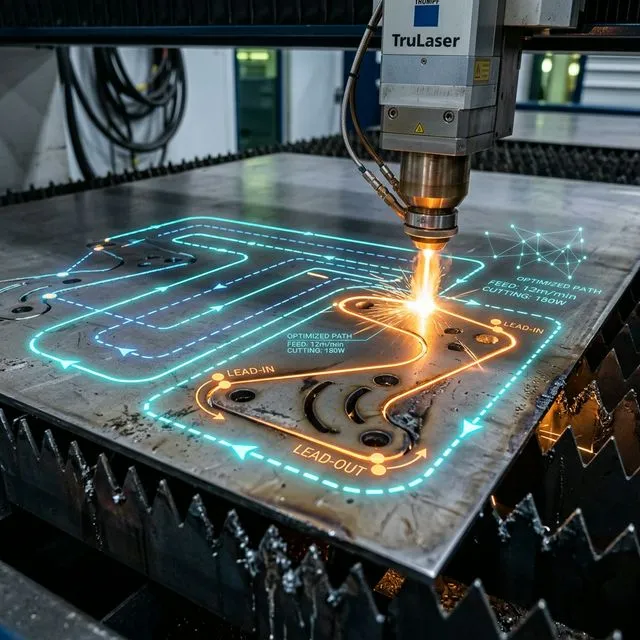
1. The 2026 Standard: Fly Cutting & Frog-Jump Traversal
Before calculating path lengths, you must implement the two most critical modern optimizations: Fly Cutting and Frog-Jump Traversal. These technologies dictate how the laser head moves between cuts, drastically resetting the baseline for cycle time capabilities.
Fly Cutting (On-the-Fly Piercing)
The laser head maintains constant velocity while rapidly firing the beam precisely over cut locations, eliminating the traditional stop-pierce-cut-stop sequence entirely.
- Best for: Dense grids, perforated patterns, thin-gauge sheet metal (<3mm).
- Time Saved: Up to 80% reduction in pierce/cut cycle time for complex meshes.
Frog-Jump (Parabolic Lift)
Replaces outdated "rectangular" Z-axis movement (up, across, down). The head lifts in a parabolic arc that seamlessly integrates with horizontal XY movement.
- Implementation: Managed entirely by the modern CNC controller.
- Safety: Utilizes capacitive height sensors to dynamically avoid tipped parts without sacrificing movement speed.
2. Part Category & Path Estimation
For quoting and capacity planning, you often need to estimate cutting path length before detailed CAM programming. Parts can be categorized by geometric complexity, and each category has a predictable path-to-area ratio:
| Part Category | Description | Path/Perimeter Ratio | Examples |
|---|---|---|---|
| Simple | Rectangles, circles, basic outlines with 0-2 holes | 1.0-1.3× | Blanks, simple brackets, washers, shims |
| Moderate | Complex outlines with 3-10 holes, notches, or slots | 1.5-2.5× | Chassis panels, mounting plates, machine covers |
| Complex | Intricate geometry, 10-50 features, tight tolerances | 2.5-4.0× | Electrical enclosures, ventilation panels, perforated screens |
| Very Complex | 50+ features, decorative patterns, dense perforations | 4.0-8.0× | Architectural panels, filter screens, artistic cuts |
Example: A 300mm × 200mm moderate panel with 6 holes. Perimeter = 1000mm. Path ≈ 1000 × 2.0 = 2000mm. At 20 m/min cutting speed: ≈ (2000/20000) × 1.3 × 60 = 7.8 seconds per part.
3. Common Cutting Patterns & Their Path Lengths
Understanding the path contribution of common geometric features helps in accurate estimation and identifies optimization opportunities:
4. Lead-In/Lead-Out Optimization
Lead-in (approach) and lead-out (departure) paths protect the workpiece from pierce marks and ensure clean closure of the cut contour. While necessary, they add non-productive path length that can be minimized:
Lead Type Comparison
Optimization Strategies
- Minimize lead length: Use 2-3mm leads for thin sheet (< 3mm), 5-8mm for thick plate
- Place pierce in scrap: Position lead-in in material that will be discarded
- Use tangential leads: Eliminates witness marks, worth the extra ~2mm path
- Common-line cutting: Eliminates leads entirely on shared edges (saves 2× lead length per shared edge)
- Overcut instead of lead-out: Small overcut (1-2mm) at contour end can replace a full lead-out on thin materials
- Skip lead-out on scrap: Internal cutouts don't need clean edge closure
A sheet with 100 parts, each requiring pierce + lead-in (5mm) + lead-out (3mm): 100 × (5 + 3) = 800mm of non-cutting path. At 10 m/min effective speed, that's 4.8 seconds. With common-line cutting reducing to 60 pierces and 2mm leads: 60 × (2 + 1) = 180mm → 1.1 seconds. Savings: 3.7 seconds per sheet.
5. Traversal (Rapid Move) Optimization
Rapid traversal — the head movement between cuts with the laser off — is the most optimizable component of cycle time. The classic “Traveling Salesman Problem” (TSP) applies here: find the shortest sequence to visit all cut contours.
Sequencing Strategies
- Nearest-neighbor: Cut the closest uncut contour next. Simple but effective — reduces traversal by 30-40% vs. random
- Inside-out: Cut internal features before outer contour (prevents parts shifting)
- Zone-based: Divide sheet into zones, optimize within each zone, then optimize zone sequence
- Column/row sweep: Process parts in a systematic grid pattern. Good for identical parts
- Gravity-aware: Cut from bottom to top to prevent parts dropping onto slats and causing head collision
Software Capabilities
Modern CAM/nesting software includes path optimization algorithms. Key features to look for:
- Automatic sequencing: TSP-based or genetic algorithm optimization
- Head-up distance tracking: Total rapid traversal distance displayed
- Simulation: Visual playback showing actual cutting sequence
- Manual override: Ability to resequence specific contours
- Common-edge detection: Automatic identification of shared edges
6. Nesting Impact on Total Path Length
Nesting — the arrangement of parts on the sheet — affects not only material utilization but also total cutting path length. A good nest can reduce path length by 10-20% compared to a poor nest with the same parts. For comprehensive nesting strategies, see our Nesting Optimization Guide.
Path-Efficient Nesting Strategies
- Common-line cutting: Adjacent parts share cut edges — eliminates kerf width + two leads per shared edge
- Part-in-part (nesting in scrap): Cut small parts from large cutouts — reduces waste and adds zero traversal
- Aligned orientation: Parts with similar features aligned reduce directional changes
- Cluster grouping: Group similar parts together to minimize tool changes and parameter switches
- Bridge cutting: Leave small tabs to hold parts in place, cut tabs in a final pass — reduces per-part piercing
Common-Line Savings Calculator
7. Batch Production Capacity Planning
Accurate capacity planning requires converting path length estimates into production time, then accounting for machine utilization and real-world efficiency factors.
| Efficiency Factor | Manual Operation | Semi-Automated | Fully Automated |
|---|---|---|---|
| Sheet change time | 3-5 minutes | 1-2 minutes | 15-30 seconds |
| Overall utilization | 65-75% | 75-85% | 85-95% |
| Effective cutting hours/shift | 5.2-6.0 hrs | 6.0-6.8 hrs | 6.8-7.6 hrs |
| Unplanned downtime | 10-15% | 5-10% | 3-5% |
Frequently Asked Questions
What is Fly Cutting in laser cutting?
Fly cutting, or "on-the-fly piercing," is an advanced 2026 cutting technique where the laser head never stops moving. Instead of stopping to pierce the material, the laser rapidly fires precisely as it passes over the programmed contour lines. This is primarily used for thin-gauge metal grids or perforated hole patterns, reducing piercing time by up to 80%.
How much cycle time can path optimization actually save?
Depending on part complexity, advanced path optimization (combining AI sequencing, common-line cutting, and short tangential leads) typically reduces total cycle time by 15% to 30% per sheet compared to unoptimized automatic routing. In a high-volume 3-shift operation, this equates to gaining hundreds of extra production hours annually.
What is Frog-Jump (Parabolic) traversal?
Frog-jump traversal is a modern Z-axis optimization algorithm. Instead of the laser head fully retracting vertically, moving horizontally, and descending vertically (rectangular movement), it moves in a fluid parabolic arc. It only lifts just high enough to avoid tipped parts, drastically slashing non-cutting rapid traverse time.
Does common-line cutting improve dimensional accuracy?
No, common-line cutting actually sacrifices a slight amount of dimensional accuracy (typically ±0.1mm) because two parts share the exact same kerf width path. It should only be used to maximize speed and material utilization on straight edges where extreme precision is not the primary requirement.
Related Guides
Path optimization data based on case studies from SigmaNEST, Lantek, TRUMPF TruTops, and Bysoft 7 CAM systems (2024-2026). Cycle time breakdowns based on production data from sheet metal fabrication facilities processing 1-25mm carbon and stainless steel. Actual results vary with machine acceleration, CAM software, and part geometry.