Laser Parameter Migration Guide: Transfer Settings Between Machines
Key Takeaway
Migrating laser parameters between machines requires three corrections: power scaling (match energy density, not just wattage), focus correction (compensate for different M² values), and speed adjustment (account for spot size and power density changes). Start at 80% of calculated values, then fine-tune with test cuts. Never assume parameters transfer 1:1 between different laser types or power levels.
When upgrading from CO₂ to fiber, scaling between power levels, or moving work between machines — your proven cutting parameters need systematic adaptation. This guide provides the engineering framework for parameter migration: the physics behind each correction, practical formulas, and a validation workflow that minimizes scrap. Use our Parameter Migration Calculator to compute migrated values automatically, or see our Material Thickness Parameters guide for reference data.
1. When You Need Parameter Migration
Parameter migration is necessary whenever the laser source or beam delivery system changes in a way that alters the energy delivered to the workpiece. Common scenarios include:
Technology Upgrade
- CO₂ → Fiber: Wavelength change (10.6μm → 1.064μm) dramatically changes material absorption
- Low-power → High-power: 3kW → 6kW or 6kW → 12kW fiber laser upgrades
- Single-mode → Multimode: Beam quality difference (M² 1.1 → 2.0) changes spot size
- Brand migration: IPG → Raycus, Trumpf → nLIGHT, etc.
Operational Scenarios
- Multi-machine shop: Moving jobs between machines with different specs
- Replacement laser source: New laser source in existing machine frame
- Optics change: New cutting head with different focal length or collimation
- Fiber change: 50μm → 100μm delivery fiber core diameter
2. Power Scaling Fundamentals
When migrating between different power levels, the goal is to maintain equivalent power density (W/cm²) at the workpiece — not simply match the wattage. Power density determines cutting capability, and it depends on both laser power and spot size.
| Migration Scenario | Spot Size Change | Power Correction | Example |
|---|---|---|---|
| Same type, higher power | Similar spot | Scale linearly with speed gain | 3kW→6kW fiber: roughly 1.5-1.8× speed increase on thin |
| Single-mode → Multimode | ~2× larger spot | Need ~4× more power for equal density | 1kW SM (d=0.08mm) → need 4kW MM (d=0.16mm) |
| CO₂ → Fiber | ~10× smaller wavelength → smaller spot | Often less power needed | 4kW CO₂ → 3kW fiber often matches on metals ≤6mm |
| Fiber core 50μm → 100μm | ~2× larger spot | Need ~4× power for equal density | 2kW/50μm → 8kW/100μm for equivalent precision cutting |
3. Focus Correction for Different Beam Quality
When M² changes, the focused spot size and depth of focus both change — requiring adjustments to focal position and standoff distance. This is critical when migrating between single-mode and multimode lasers. See our Focus Position Guide for detailed focal position optimization.
For example, migrating from M²=1.1 to M²=2.0: spot diameter increases by 2.0/1.1 = 1.82×, so spot area increases by 3.3×.
Higher M² gives larger DOF — more tolerance to focus position errors. This can be an advantage for thick plate cutting where material flatness varies.
| Material | Single-Mode (M²≈1.1) | Multimode (M²≈2.0) | Adjustment |
|---|---|---|---|
| Carbon steel ≤6mm | Focus at -1mm to -2mm | Focus at -1mm to -3mm | Shift 0 to -1mm deeper |
| Carbon steel 6-12mm | Focus at -2mm to -4mm | Focus at -3mm to -6mm | Shift -1 to -2mm deeper |
| Stainless ≤3mm | Focus at 0 to -1mm | Focus at -0.5 to -2mm | Shift 0 to -1mm deeper |
| Aluminum ≤6mm | Focus at -1mm to -2mm | Focus at -2mm to -4mm | Shift -1 to -2mm deeper |
4. Speed Correction Matrix
Cutting speed must be adjusted to account for changes in power density and material absorption. The relationship is not linear — doubling power does not double speed due to thermal saturation effects and gas dynamics.
| Power Change | Thin Sheet (≤3mm) | Medium Plate (3-12mm) | Thick Plate (12-25mm) |
|---|---|---|---|
| 3kW → 6kW (2×) | +50-70% speed | +40-60% speed | +30-50% speed + thicker capability |
| 6kW → 12kW (2×) | +40-60% speed | +35-55% speed | +25-40% speed + thicker capability |
| CO₂ 4kW → Fiber 3kW | +100-200% speed (metals) | +50-100% speed | Similar or +10-30% |
| SM → MM (same power) | -20-35% speed | -10-20% speed | Similar or +5-10% (DOF advantage) |
5. Cutting Parameter Migration Workflow
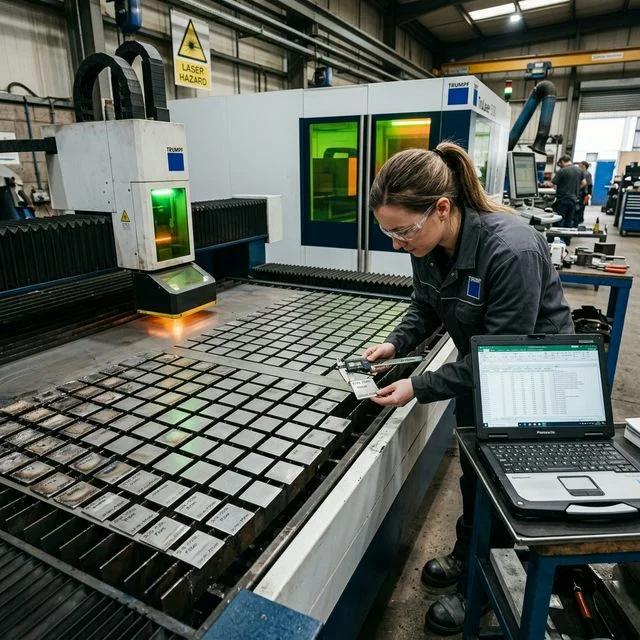
Follow this structured workflow when migrating cutting parameters to a new machine. The process typically requires 2-4 hours per material/thickness combination.
Record all parameters from the source machine: power, speed, frequency, duty cycle, gas type and pressure, nozzle type and diameter, focus position, standoff distance, piercing parameters, and lead-in/lead-out settings.
Apply power scaling (Section 2), focus correction (Section 3), and speed correction (Section 4) formulas. Document each calculated value alongside the source parameter for comparison.
Use 80% of calculated speed for the first cut. Cut a straight line (200mm+) and evaluate: did it cut through cleanly? Check edge quality per ISO 9013. Examine burr, dross, and edge roughness.
Increase speed in 5% increments until quality degrades, then back off 5-10%. Fine-tune focus position in 0.5mm increments. Adjust gas pressure in 0.5-1 bar increments. Record each test result systematically.
Cut a representative test part with corners, small holes, and varying geometry. Verify dimensional accuracy, edge quality, and consistency. Document final parameters as the new baseline for this material/thickness/machine combination.
6. Marking & Engraving Parameter Migration
Marking and engraving parameter migration follows similar principles but with additional considerations for surface finishing, contrast, and color marking. The key difference is that marking operates at much lower power densities and relies more on pulse parameters.
Key Differences from Cutting
- Pulse parameters dominate: Frequency, pulse width, and peak power matter more than average power
- Surface interaction: Material absorption varies significantly with surface condition
- Scan speed vs. cut speed: Galvo scan speed (up to 10,000 mm/s) vs. gantry speed (typically < 60,000 mm/min)
- Fill pattern: Hatch spacing, angle, and overlap affect marking quality
Migration Checklist
- Match peak power density (not average power)
- Convert frequency to maintain pulse overlap percentage
- Adjust hatch spacing proportional to spot size change
- Recalibrate galvo field correction for new focal length
- Verify marking contrast meets readability standards
- Test on actual production parts, not just test coupons
7. Validation & Fine-Tuning Procedure
After initial parameter calculation, systematic validation ensures reliable production quality. This procedure applies to both cutting and marking migrations.
Cutting Validation Tests
- Straight line: 200mm minimum, check full separation and edge quality
- Sharp corners: 90° and 45° corners at production speed
- Small circles: Holes from 1× to 5× material thickness diameter
- Thick-to-thin transition: Parts with varying section widths
- Piercing test: 50+ pierces to verify consistency
- Long run: Continuous cutting for 30+ minutes, check thermal stability
Acceptance Criteria
- Edge quality: Meets target ISO 9013 range
- Dimensional accuracy: Within ± 0.1mm (thin) or ± 0.2mm (thick)
- Burr height: < 0.1mm (stainless N₂), < 0.3mm (carbon O₂)
- Kerf width consistency: Variation < 10% over 200mm cut
- Small hole quality: No failed pierces, clean entry and exit
- Repeatability: 10 identical parts show consistent quality
Frequently Asked Questions
Can I directly copy parameters from one machine to another?
Only if both machines have identical laser sources (same manufacturer, model, fiber type), identical cutting heads (same focal length, collimation), and identical gas delivery systems. Even then, minor adjustments are usually needed due to machine alignment and component aging. For different laser types or power levels, systematic parameter migration is essential.
How long does parameter migration take?
For a single material/thickness combination: 2-4 hours including calculation, test cuts, and fine-tuning. A complete migration from CO₂ to fiber covering 10+ material/thickness combinations typically requires 3-5 working days. Budget an additional day for marking and engraving parameter migration if applicable.
What if the calculated parameters produce poor quality?
Formulas provide a starting point, not the final answer. If quality is poor: first verify beam quality (M²) and power output match specifications. Then check gas delivery (pressure, flow, nozzle condition). Finally, systematically adjust one parameter at a time — focus position first, then speed, then gas pressure. Keep a detailed log to avoid circular adjustments.
Related Guides
Parameter values and speed corrections based on published data from IPG Photonics, Trumpf, Bystronic, and AMADA application guides (2024-2026). Actual results vary with machine condition, material batch, and environmental conditions. Always validate on your specific system.